N.°01 live
Arch Studio
Your firm. Your data. Your way of working. An agentic studio for architecture practice, built on four layers — governance, knowledge, execution, memory.
02 What it is
Install it and gain the foundation of an agentic architecture studio — not a pile of parts.
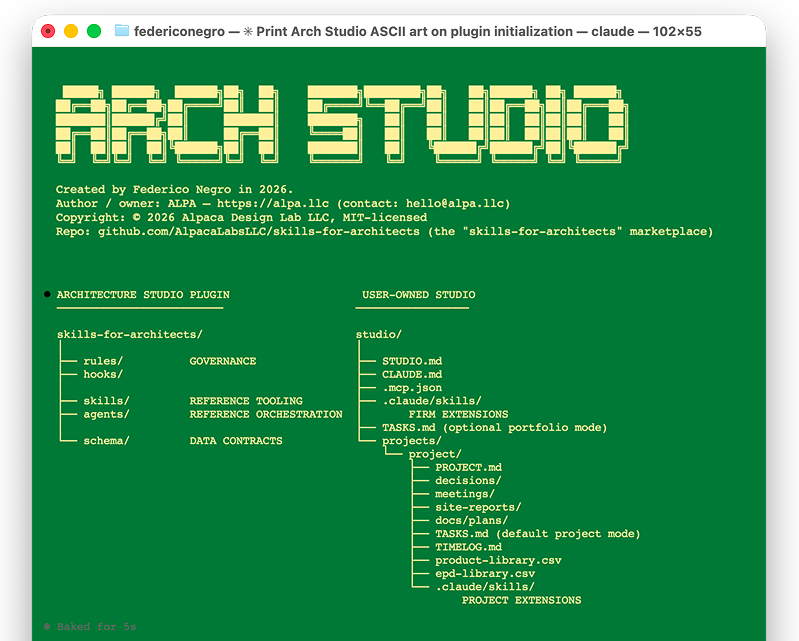
Arch Studio is an agent harness and institutional-memory system for architecture firms, organized in four layers: governance sets the working rules, knowledge links out to codes and standards, execution is the skills and agents that do the work, memory keeps the record. Install the open-source plugin and work in the terminal with Codex or Claude Code, or connect the hosted MCP and work inside your Claude or ChatGPT app directly. Same release, two ways in.
03 The harness
An opinionated operating system for architectural practice.
The dedicated Arch Studio harness runs in the terminal and pairs an architecture-aware primary agent with durable, local-first studio memory. Every consequential action — enabling a skill, admitting a note, invoking a remote tool — is approval-gated.
i.
Studio memory
A user-owned local workspace holds conversations, connectors, skills, and project registrations. Projects live anywhere and are attached, not copied — PROJECT.md holds the facts, decisions/ holds the reasoning, and approved notes become durable project memory.
ii.
Architecture-aware agent
A primary agent with architecture-specific workflows that coordinates skills and tools at the right time — document inspection with cited findings, approval-gated notes, and evidence that stays traceable to its source.
iii.
Firm-authored skills
Scaffold standard skill packages in your own workspace. New packages stay drafts until explicitly enabled; enabled skills are advertised to the agent by name and loaded only when needed.
iv.
Governed MCP connectors
Add your own MCP connectors, inspect the remote tool catalog, choose an explicit allowlist, then enable. Every remote invocation requires approval and carries provenance — connector, server, trust level, and tool name.
04 Available today
One catalog, native to Codex and Claude Code.
Arch Studio 1.5.0 ships as one open-source plugin with two host packages. Codex loads all 61 skills. Claude Code loads the same skills plus eight native agents, Norma among them, and its host-specific hooks. Nothing else to install: every skill is a complete specification the host performs with its own tools. The studio and project records stay portable between them. The hosted MCP delivers the same 1.5 release into Claude or ChatGPT directly, free for firms, no plugin required.
i.
Host-native routing
Use $studio in Codex or /as:studio in Claude Code. Codex routes complex work through explicit skill sequences; Claude Code can also delegate to the eight bundled native agents.
ii.
Skills
Every skill follows the host’s own syntax: $product-research in Codex and /as:product-research in Claude Code. The instructions, supporting references, and output contracts are shared.
iii.
Learn
A guided, resumable course in the terminal. Start with $learn in Codex or /as:learn in Claude Code; the same six-module project branches where the hosts differ.
iv.
Project memory
PROJECT.md holds the facts; DOCUMENTS.csv, TASKS.csv, TIME.csv, INVOICES.csv and CHANGES.csv hold the registers, each row with its source and history. New workspaces include AGENTS.md and .agents/skills/ for Codex alongside CLAUDE.md and .claude/skills/ for Claude Code.
05 Built for
01
Interior designers
FF&E sourcing, spec writing, and procurement — surfaced as host-native skills inside the studio.
02
Architects
Zoning analysis, envelope, code-check, programming. The repetitive work that eats time before design begins.
03
Sustainability specialists
EPDs, embodied carbon, certification logic. Pulled, parsed, compared, written into the spec.
04
Small studios
An agentic teammate with the firm's memory. Install once, the whole studio benefits.
06 By the numbers
358
Stars on GitHub
72
Forks
15
Releases — open-sourced March 2026, now at 1.5.0
07 Get started
Choose your host and follow its install path.
The plugin and the hosted MCP are alternative ways to run Arch Studio, not consecutive installation steps. Choose the path you want; both are free, and both deliver the same 1.5 release.
Codex path
Install in Codex
Run codex plugin marketplace add AlpacaLabsLLC/skills-for-architects, then codex plugin add as@skills-for-architects. Open Codex and invoke $studio.
Claude Code path
Install in Claude Code
Run claude plugin marketplace add AlpacaLabsLLC/skills-for-architects, then claude plugin install as@skills-for-architects. Open Claude Code and run /as:studio.
Hosted MCP path
Connect the hosted MCP
No install. Sign in at architecturestudio.ai with your firm's account, connect the MCP in Claude or ChatGPT, and Norma takes it from there. Free for firms.
08 Inside · the catalog
Browse what ships with the studio.
Every agent, every skill, every plugin — listed, linked, and searchable. Source on GitHub, MIT-licensed, contributions welcome.
i.
Agents
Domain specialists who orchestrate skills to finish work end to end.
ii.
Skills
Single-purpose commands. Predictable inputs, predictable outputs, composable.
iii.
One plugin
Install as@skills-for-architects once. Both hosts load the shared catalog; Claude Code also registers the bundled agents and hooks.
iv.
Docs
Installation, usage, and the architecture behind the agents.
Install the studio.
Free, open source, MIT-licensed. Built for the desk you already work at.
Install guide →